
Rebranding
name, ids, icon, colours, fonts.
Make the app yours before the first store release: the app name, the Android application id and iOS bundle id, the App Group, the icon, the colours and the fonts.
01Without code: what the console can and cannot change
Some branding changes take effect in apps already on users' phones. Others are part of the app file you upload to the stores, so they need a new build and a store update. The table says which is which.
| You want to change | Where | New build needed? |
|---|---|---|
| App name inside the app: onboarding, the Pro screen and banners ("<name> Pro"), the About and licence pages, and the title Android shows in the recent-apps list | Console → Brand → Product name | No |
| Accent colour (logo tiles, headers, the glow on hero cards, icons; see details) | Console → Brand → Accent colour | No |
| Support e-mail shown on the About page | Console → Brand → Support email | No |
| Privacy and terms links, the disclaimer, the labels "AI-generated", "Automatic summary", "Sponsored", "Affiliate link" | Console → Legal | No |
| Name under the icon on the home screen | AndroidManifest.xml and Info.plist (App name on the home screen) | Yes |
| App icon and logo | Icon files in the Android and iOS projects (App icon). The console has no logo field: the Admin Kit's logo field is removed on purpose because the app does not read it (admin/src/manifest.ts). | Yes |
| Application id, bundle id, App Group | Build files (Application id and bundle id) | Yes, and only before the first store upload |
| Other colours (backgrounds, the green and red for gains and losses, the lime highlight), fonts | app/lib/core/theme.dart (Colours, Fonts) | Yes |
| Colours of the home-screen widgets | Native widget files (Colours) | Yes |
- Open BrandSign in to the console and choose Brand in the left menu. Owners and managers can edit; viewers can only read.
- Type the new namein Product name. It cannot be empty.
- Pick the accent colourClick the colour square, or type a 6-digit hex code such as
#3B82F6. Anything else makes the app fall back to the default green#10B981. - SaveThe console writes the change to Firestore straight away; Status → "App config written to Firestore" shows the new version number.
- See it in the appClose the app completely and open it again. The app loads its settings when it starts, and the API keeps them for up to 60 seconds, so allow a minute.
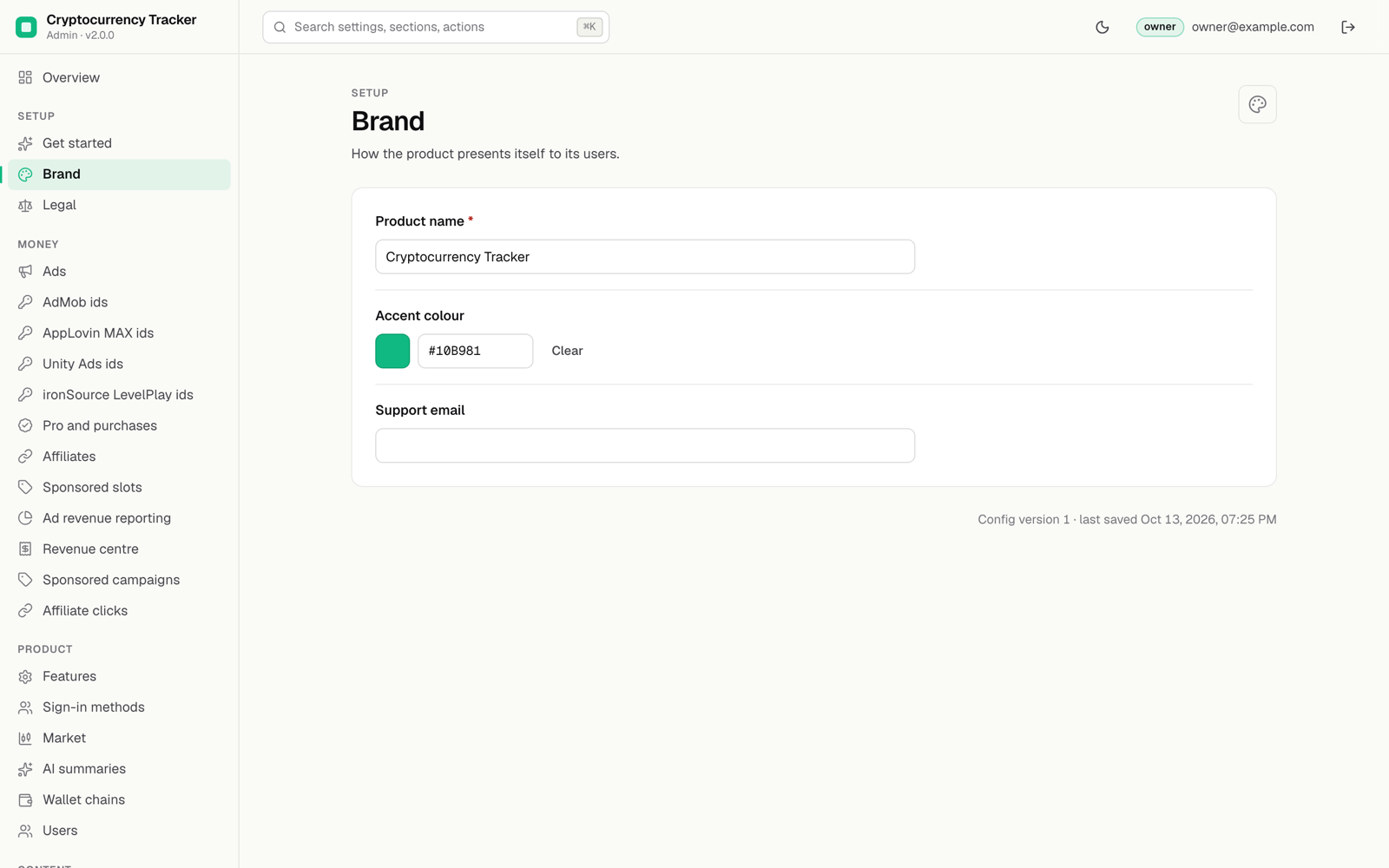
The name users see in Google Play and the App Store is set in Play Console and App Store Connect, not in the app or the console.
02Live from the console
Console → Brand changes these without a new build (the app reads them from /v1/config):
- App name: the title used inside the app (default "Cryptocurrency Tracker"). The Pro screen and the Pro banner use it too: "<App name> Pro".
- Accent colour: the brand colour of the "Obsidian" design in light and dark theme (default
#10B981): the brand gradient (accent blending into lime) on the logo tiles, the Pro, onboarding, sign-in and report headers, the aurora glow of hero cards, icons and progress and focus colours in the light theme. Price charts are not tinted by it: they are green when the range went up and red when it went down. It must be a 6-digit hex value such as#3B82F6; anything else falls back to the default (parseHexinapp/lib/core/theme.dart). The lime highlight (selected pills, primary buttons on dark) is a fixed design token, see Colours. - Support e-mail.
The name under the icon on the phone, the icon itself and the ids are part of the build; change them below.
03App name on the home screen
| Platform | File | Key |
|---|---|---|
| Android | app/android/app/src/main/AndroidManifest.xml | android:label="Crypto Tracker" |
| iOS app | app/ios/Runner/Info.plist | CFBundleDisplayName and CFBundleName |
| iOS widget | app/ios/CryptoTrackerWidget/Info.plist | CFBundleDisplayName |
| Web demo | app/web/index.html | <title>, apple-mobile-web-app-title, description and theme-color |
| Web demo | app/web/manifest.json | name, short_name, description, background_color, theme_color |
| Texts | app/tool/gen_en_arb.py and app/lib/l10n/app_*.arb | The Pro title (proTitle, "{appName} Pro") already takes the console's app name; no other screen text in the ARB files contains the product name. |
04Application id and bundle id
The package ships with com.yourcompany.cryptotracker. Pick your own, for example com.example.coinwatch, before you run flutterfire configure and before the first store upload: a published id cannot be changed.
- AndroidIn
app/android/app/build.gradle.ktschangeapplicationId. You can leavenamespaceand the Kotlin package folder as they are: the widgets refer to the Kotlin package, not to the application id. - iOSOpen
app/ios/Runner.xcworkspacein Xcode → target Runner → Signing & Capabilities → Bundle Identifier. Then setAPP_BUNDLE_IDinapp/ios/scripts/add_widget_extension.rbto the same value and runcd app/ios && ruby scripts/add_widget_extension.rb: it gives the widget extension the bundle id<your id>.CryptoTrackerWidget. - ConsoleEnter the same ids under Pro and purchases (Android package name, iOS bundle id) for purchase verification.
- FirebaseRun
flutterfire configure(Installation).
05App Group (iOS)
Change group.com.yourcompany.cryptotracker to group.<your bundle id> in the four places listed in Widgets, and register the group in your Apple Developer account for both App IDs (the app and the widget extension).
06App icon
The source logo is app/assets/brand/logo-1024.png. Replace the generated icons with yours:
| Platform | Files |
|---|---|
| Android | app/android/app/src/main/res/mipmap-*/ic_launcher.png (mdpi 48, hdpi 72, xhdpi 96, xxhdpi 144, xxxhdpi 192 px) |
| iOS | app/ios/Runner/Assets.xcassets/AppIcon.appiconset/ (every size listed in its Contents.json; the 1024 px one must have no transparency) |
| Web demo | app/web/favicon.png, app/web/icons/ |
Any icon generator works, for example Android Studio's Image Asset tool and Xcode's single-size App Icon. The Android widget preview uses @mipmap/ic_launcher, so it follows your icon.
07Colours (design tokens)
The app's look is called "Obsidian": near-black layered surfaces with hairline strokes in dark mode, an equally styled light theme, the console's accent colour and a lime highlight. Every colour is a token in one file, app/lib/core/theme.dart, so you change them there rather than in the screens.
| Where in theme.dart | What it controls |
|---|---|
AppColors.emerald | Fallback accent when the console's accent is missing or invalid. The live accent comes from Console → Brand. |
AppColors.lime | The highlight: selected pills and tabs, primary (filled) buttons, switches and the floating action button on dark; text buttons and focus on dark. On light the highlight is the ink colour instead (Palette.of). |
AppColors.up, down, upLight, downLight | Gains and losses on dark and on light surfaces. The light versions are darker for a 4.5:1 text contrast on white; keep that contrast if you change them. |
AppColors.darkBg, darkSurface, darkSurface2, darkInk and the light… set | Background, card and raised-surface colours and the text colour for each theme. |
AppColors.amber, sky, violet, AppColors.chart | Secondary colours (for example the "Fear" band) and the allocation-chart palette (accent first). |
Palette (context.pal in widgets) | The per-theme set the screens read: bg, surface, surface2, stroke, ink, muted, up, down, highlight, onHighlight, accent. |
buildTheme | Maps the tokens onto Flutter's Material 3 theme: buttons (pill shape, 52 px high), cards (22 px corners), sheets, dialogs, inputs, chips, switches, snack bars, page transitions. |
Motion | Animation durations (180, 320, 600 ms) and curves. |
- Home-screen widgets use native colours, not these tokens:
app/android/app/src/main/res/values/ct_widget_colors.xml,values-night/ct_widget_colors.xmlandThemeinapp/ios/CryptoTrackerWidget/CryptoTrackerWidget.swift. - Web demo frame: the dark colour around the phone frame in the browser is in
_WebFrame,app/lib/app.dart;theme-colorandbackground_colorinapp/web/. - Setup screen (shown only to you while the build is not configured):
app/lib/ui/screens/setup_required_screen.dart.
08Fonts
The app bundles two variable fonts under the SIL Open Font License 1.1: Space Grotesk for titles and large numbers, and Inter for the interface, both with tabular figures so prices line up (Credits).
| Piece | Where |
|---|---|
| Font files and licence texts | app/assets/fonts/inter/ and app/assets/fonts/spacegrotesk/ (*-Variable.ttf and OFL.txt) |
| Font families | fonts: in app/pubspec.yaml (families Inter and SpaceGrotesk); the OFL.txt files are listed under assets: |
| Which family is used where | Fonts.display and Fonts.ui in app/lib/core/theme.dart; buildTheme uses the display font for display, headline and large titles, the UI font for everything else; Fonts.big styles big prices |
| Licence page entry | _registerFontLicenses in app/lib/main.dart adds both OFL texts to the app's licence page (Settings → About, or More → About, then Open-source licences) |
- Add the filesPut your font files and their licence in
app/assets/fonts/<name>/. Only use fonts whose licence allows embedding in an app. - Declare themAdd a family under
fonts:inapp/pubspec.yamland the licence file underassets:. - Use themChange
Fonts.displayand/orFonts.uito the new family names. - WeightsThe app sets the weight on the variable
wghtaxis (Fonts.wght). With a variable font nothing else is needed. With static fonts, list one file per weight inpubspec.yamlwithweight: 400,500,600,700. - Licence pageUpdate the names and paths in
_registerFontLicenses(app/lib/main.dart), and remove fonts you no longer ship from the assets and from your credits. - Check
flutter testruns a layout sweep of every screen in every language at 360 px; wider fonts can make texts overflow there. Hindi and Arabic glyphs are not in Inter or Space Grotesk and come from the system fonts.
09Shared widgets and the chart
Screens are built from a small set of shared widgets, so a change in one place changes every screen:
| File | Contains |
|---|---|
app/lib/ui/widgets/kit.dart | Segmented pill tabs, chips, round icon buttons, rolling price digits and count-up totals, the aurora glow and shine of hero cards, statistic tiles and grids, news source monograms, pull-to-refresh, the Fear & Greed arc gauge, the sentiment split bar, grouped settings cards and rows, the screen header, the AI or automatic label chip, the alert bell toggle and selectable pills. |
app/lib/ui/widgets/market_chart.dart | The coin chart: area line or candlesticks, draw-in and range morphing, touch or hover crosshair with haptic ticks, the OHLC tooltip and the last-price tag. |
app/lib/ui/widgets/motion.dart | Reduced-motion check, staggered list entrances, spring press, fade-through page transitions, shimmer loaders. |
app/lib/ui/widgets/common.dart, coin_tile.dart, sparkline.dart, reading.dart | Cards, the data attribution line, coin rows and watchlist cards, sparklines, the reading layout of the market brief and coin reports. |
10Motion and reduced motion
The app animates rolling price digits and price flashes, chart draw-in and range changes, count-up totals, a slow glow on hero cards, staggered lists, a spring press, a price "hero" flight from a markets row to the coin page, shimmer loaders and fade-through page transitions. When the phone's system setting asks to reduce motion (iOS Reduce Motion, Android "Remove animations"), every decorative animation is skipped and values change instantly (reduceMotion and motionOf in app/lib/ui/widgets/motion.dart). To tone motion down for everyone, shorten the Motion durations in theme.dart; keep the reduced-motion checks when you add animations.
11Legal pages and the deep link
- Set your privacy policy and terms URLs in Console → Legal. The app links to them from its legal screen.
- The widgets open the app with the URL scheme
cryptotracker://(CFBundleURLSchemesinapp/ios/Runner/Info.plist,linkSchemeinapp/lib/services/widget_sync.dart,WidgetStore.kt,WidgetStore.swift). You can keep it; if you change it, change it in all four.